5 Ways Virtual Meetings improve Productivity
December 13, 2025

December 13, 2025
Most people think of virtual meetings simply as a way to talk to people who are far away. But there is a much deeper relationship between virtual meetings and your daily productivity.
Productivity is not just about working faster. It is about getting the right things done without wasting energy. Virtual meetings change the way we work, and help teams finish tasks sooner and with fewer errors.
Virtual meetings improve productivity by removing the physical friction that usually slows down office work. In a traditional setting, a significant amount of time is wasted on walking to conference rooms, waiting for others to arrive, and recovering your focus after the interruption.
Most virtual meeting platforms put you in front of your computer where all your digital tools are ready to use from one place. Having this flexibility gives you the power to handle the work, the documentation, and the decision-making all in one focused session. This digital environment allows you to finish tasks faster and get back to your core work without losing momentum.
It is natural to ask if sitting at a computer is actually better than meeting face-to-face. Some people worry that not being in the same room makes teams less connected or less serious about their work. But when we look at how work actually gets done, the answer is yes. Virtual meetings do improve productivity, and they do it by changing how you spend your energy.
To understand this, you have to look at what happens in a traditional office meeting. Unlike a complicated physical conference video system, a virtual meeting on your laptop is not an interruption. You have to stop what you are doing, pack up your things, walk to a different room, and wait for everyone to settle down. These small actions might seem harmless, but they waste time. They also break your mental focus. You spend energy moving your body instead of using your brain.
Virtual meetings remove these wasted steps. When you use online conferencing platforms, you remain at your desk. You stay in your work environment. Your files, your data, and your tools are right in front of you. You do not have to carry them to another room. This means the meeting is not an interruption to your workflow. It becomes a part of your workflow.
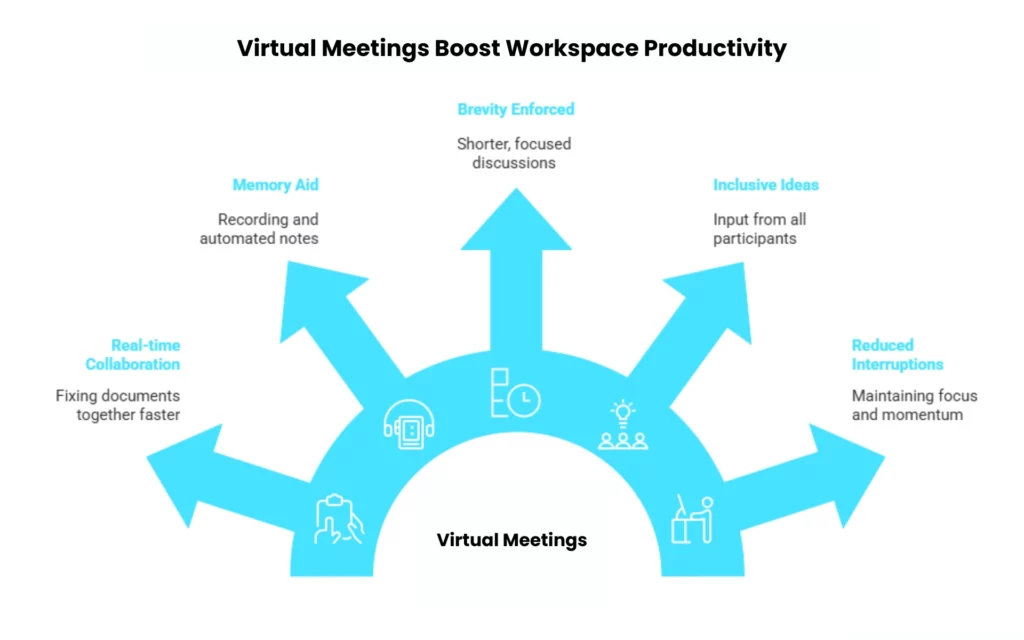
Here is how the shift to virtual meetings directly impacts your ability to get work done.
In the past, a meeting was a place where people talked about work. You would sit in a room, discuss a problem, and then go back to your desk to fix it. This process creates a delay. You talk first, and you do the work later.
Virtual meetings remove this delay. Because you are already on your computer, you can share your screen. This allows everyone to look at the same document at the same time. You do not just talk about the spreadsheet or the report. You open it and fix it together. Research on team collaboration shows that fixing documents together in real-time is much faster than emailing files back and forth. You avoid the confusion of having multiple versions of the same file.
So, when you use virtual meetings this way, you improve productivity by finishing the task during the call itself. You do not have to put the task on a “to-do” list for later. The work is completed the moment the meeting ends, which saves you hours of follow-up work.
Human memory is not perfect. When you sit in a physical meeting, you rely on your notes. If you miss a sentence, or if your handwriting is messy, that information is lost forever. This leads to mistakes later on. It also forces people to have follow-up meetings just to clarify what was said.
Virtual meetings solve this problem through recording and automated notes. When a meeting is recorded, it becomes a perfect record of the conversation. Studies from IBM and other knowledge management experts show that employees spend a large amount of time just looking for lost information. With virtual meetings, you do not have to search your memory. You can look at the transcript. This acts like a safety net.
So, when you use virtual meetings, you improve productivity by eliminating the need to search for answers. You do not waste time arguing about what was decided last week. You can find the exact answer in seconds, allowing you to move forward with your work instantly.
There is a natural tendency for work to expand to fill the time available. This is known as Parkinson’s Law. If you schedule a physical meeting for one hour, people will usually talk for the full hour, even if they finish the main topic in twenty minutes.
Virtual meetings tend to change this behavior. Data from Microsoft and other tech companies shows a shift toward shorter meetings. Thirty-minute meetings are becoming more common than one-hour meetings. Virtual calendars have hard stop times. You can see the clock ticking on your screen. This visual reminder encourages people to get to the point. It cuts out the idle chatter and focuses the conversation on the decision that needs to be made.
So, when you use virtual meetings, you improve productivity by giving yourself more time back in your day. By strictly following the clock, you cut out wasted time. This gives you extra hours every week to focus on your actual job duties instead of sitting in a room listening to people talk.
In a physical conference room, the conversation is often dominated by the loudest or most confident person. Quieter people, even if they have great ideas, might feel shy about interrupting. This means the team misses out on valuable input.
Virtual meetings level the playing field. They offer tools like chat boxes and polls. These features allow people to share their thoughts without speaking over someone else. Research on brainstorming shows that “silent brainstorming,” where people write down ideas simultaneously, often produces better results than vocal shouting matches. When you can type an idea in the chat, you are more likely to participate.
So, when you use virtual meetings, you improve productivity by finding the best solution faster. You do not get stuck with the first idea shared by the loudest person. You get inputs from the whole group quickly, which helps you solve complex problems correctly on the first try.
The biggest enemy of productivity is interruption. When you are deeply focused on a difficult task, your brain is in a state of flow. If you have to stop, pack up your laptop, walk to a conference room, and wait for others to arrive, you break that focus completely.
A study from the University of California, Irvine, found that it takes roughly 23 minutes to get your full focus back after you are interrupted. Physical meetings create a long interruption. You lose time walking there, settling in, and walking back. Virtual meetings minimize this cost. You can join a meeting with one click.
So, when you use virtual meetings, you improve productivity by protecting your focus. Because you do not have to physically leave your desk, you can switch back to your deep work immediately after the call ends. This allows you to maintain your momentum throughout the day.
Here are three simple strategies to make your virtual meetings even more productive.
In many meetings, the host spends the first fifteen minutes reading slides or explaining a document to the group. This is a slow way to share information. It forces everyone to sit and listen to something they could have read much faster on their own.
To maximize the productivity of your teams meeting, send the documents or reports one day before. Ask them to read it before they join the call. When the meeting starts, you do not have to waste time presenting the basic facts. You can skip straight to the discussion. This allows you to spend the entire meeting solving problems and making decisions.
Most people schedule meetings for exactly thirty minutes or exactly one hour. This leads to a problem called “back-to-back fatigue.” If one meeting ends at 10:00 AM and the next one starts at 10:00 AM, you have zero seconds to rest your brain. You arrive at the second meeting feeling tired and distracted.
A better strategy is to schedule “speedy meetings.” If you need an hour, schedule it for fifty minutes. If you need thirty minutes, schedule it for twenty-five minutes. This creates a small gap between your calls. You can use this time to stretch, get water, or reset your focus. This small break ensures that you are fresh and ready to be productive in the next session.
It is easy to invite a large group of people to a virtual meeting just in case they might be needed. But having too many people on a call actually slows down productivity. When there are too many voices, the conversation loses focus. Also, the people who do not need to be there are wasting time that they could use for other work.
Be very strict about your guest list. Only invite the specific people who need to speak or make a decision. If someone just needs to know the outcome, do not invite them to the meeting. Instead, send them a short summary email after the meeting is over. This respects their time and keeps your meeting focused on action.
We have discussed how virtual meetings can change your workday. You now understand that moving your collaboration online saves time, improves focus, and helps you capture information accurately. But understanding these benefits is only the first step. To actually feel the difference, you need a reliable virtual meeting platform solution that supports this new way of working.
This is where inMeet comes in.
If you try to apply these productivity strategies on a platform that lags, freezes, or requires difficult downloads, you will lose all the time you hoped to save. Your tools should not create new problems. They should simply work.
Unlike complex video calls software, inMeet is designed to remove every barrier between you and your work. It runs directly in your browser, so you never waste time on installations. It uses smart technology to keep your video clear, even when your internet is not perfect. And it includes AI features that handle the note-taking for you, so you never miss a detail.
You do not need to change your entire office to see the benefits of virtual working. You just need to change how you meet. You can start using inMeet today for free. It is the simplest video conferencing tool to turn your meetings from a time-waster into your most productive business tool. Sign up for your free account now and experience a faster, clearer way to work
You can make meetings productive by setting a clear agenda and sharing documents before the call starts. It also helps to invite only the people who really need to be there to make decisions. This keeps the conversation focused and ensures you finish on time.
The most helpful tools are screen sharing for real-time collaboration and recording features for accurate notes. Chat boxes are also excellent because they allow team members to share ideas instantly without interrupting the speaker. Using these features helps you finish tasks during the call instead of doing them later.
Virtual meetings eliminate the need for physical travel, which saves hours of commuting time and money spent on transportation. You also avoid the time usually wasted on walking to conference rooms and waiting for people to settle in. This allows you to apply that saved time directly to your core work.
You need a reliable computer with a working camera and microphone, along with a stable internet connection. It is also best to use a meeting platform that runs directly in your browser so you do not have to manage complex software updates. This simple setup ensures everyone can communicate clearly without technical delays.
AI tools automatically record and transcribe the conversation so you do not have to take notes by hand. This allows you to focus one hundred percent on the discussion instead of worrying about missing details. You end up with a perfect written record that you can easily search through later.
Have questions or need assistance? Fill out the form, and we'll get back to you right away!
Usually in 24 hours on working days.