9 Security Features to Check Before Choosing a Video Meeting Platform
February 5, 2026
February 5, 2026
To ensure a video meeting platform is secure, businesses must verify 9 essential features: AES 256-bit End-to-End Encryption, Multi-Layered Security, Waiting Rooms, Meeting Locks, On-Premise Deployment Options, Dedicated Subdomains, WebRTC Architecture (No Downloads), Granular Host Controls, and strict AI Data Privacy protocols.
Imagine this scenario: Your executive team is finalizing a merger. The slides are confidential, the numbers are sensitive, and the stakes are high. The meeting ends, and everyone logs off, feeling secure. Two days later, a competitor mimics your strategy with frightening precision.
There was no spy in the room. The culprit was a vulnerability in your video conferencing software perhaps a fat client download that contained malware, or a cloud recording stored on a shared public server.
According to the IBM Cost of a Data Breach Report 2024, the global average cost of a data breach has spiked to $4.88 million. Your meeting platform is no longer just a communication tool; it is the digital vault of your company’s intellectual property.
At inMeet, we don’t just add security as an afterthought. With our Version 1.3 release, we have built a WebRTC-based, client-less solution that removes the most common attack vectors entirely.
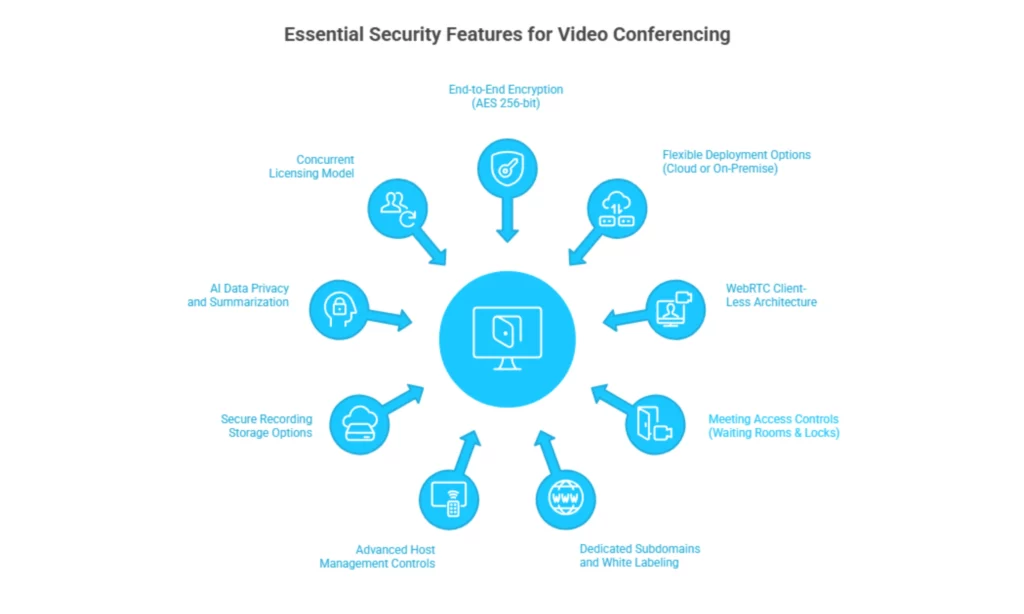
To keep your digital vault locked, verify these 9 features before choosing your next platform.
Many platforms claim to be “encrypted,” but standard encryption often leaves the service provider with the keys to your data. You need End-to-End Encryption (E2EE) where only the participants hold the keys.
Most video platforms force you to use their public cloud. But for government, healthcare, and finance sectors, this often violates data sovereignty laws.
One of the biggest security risks in 2025 is the requirement to download software (“fat clients”) to join a meeting. These executable files can be entry points for malware or require constant patching by your IT team.
“Zoombombing” remains a threat for open links. A robust platform must offer active perimeter defenses to stop intruders before they enter.
Generic meeting links are easy for scammers to mimic. A secure platform should strengthen your brand authority and security simultaneously.
Security is often about controlling behavior inside the meeting. Can you stop a disgruntled employee from screen-sharing sensitive data?
Recordings are often more sensitive than the live meeting itself. Where do they go?
AI is a powerful tool, but it must be used responsibly. You need to know if your meeting summaries are secure.
High security usually comes with a high price tag—but it doesn’t have to. Most platforms charge you for every employee, even if they don’t host meetings.
If you are evaluating general platform capabilities alongside these security features, check out our full comparison guide: Choose Best Online Meeting Platform.
| Feature | Standard Platform | inMeet (Enterprise Secure) |
|---|---|---|
| Encryption | TLS (In-transit only) | AES 256-bit End-to-End |
| Architecture | Requires App Download | 100% Client-Less (WebRTC) |
| Deployment | Public Cloud Only | On-Cloud OR On-Premise |
| Meeting Access | Generic Links | Dedicated Subdomains |
| Recordings | Cloud Only | Local & Cloud Options |
| Licensing | Pay-Per-User | Concurrent Licensing (Save 70%) |
inMeet differentiates itself through its On-Premise Deployment option and Client-Less WebRTC architecture. While many platforms rely solely on public cloud servers and often require software downloads, inMeet allows for total data sovereignty and zero-download access, significantly minimizing your organization’s attack surface.
AES (Advanced Encryption Standard) 256-bit is one of the most secure encryption methods available. inMeet uses this standard to ensure that your video, audio, and screen-sharing data cannot be “cracked” by brute force attacks.
Yes. inMeet is designed for high-compliance sectors. Our Government & Public Sector solutions and Healthcare Provider capabilities are built to meet rigorous privacy standards, supported by our ability to deploy servers within your own secure network.
It allows you to provide a secure, sanctioned video tool to 100% of your employees instead of just a few license holders. When employees lack a licensed tool, they often use insecure free apps (“Shadow IT”). Concurrent licensing makes it affordable to give everyone a secure corporate login.
Have questions or need assistance? Fill out the form, and we'll get back to you right away!
Usually in 24 hours on working days.