How inMeet is the Effortless Webinar Hosting Platform for Your Team
December 18, 2025
December 18, 2025
Hosting virtual webinars used to be a difficult task. In the past, you needed a team of technical experts just to get a video stream working. You had to ask your audience to download heavy software. You had to worry about internet connections dropping out. It was stressful for the host and frustrating for the attendees.
But technology has changed. We now have tools that make connecting with a large audience simple and reliable. One of the leading webinar platforms for teams in this new era of communication is inMeet.
This article will explain exactly how inMeet changes the way teams host webinars. We will look at why it is different from older software. We will explore the features that make it easy to use. By the end, you will understand how your team can use inMeet to share ideas with the world without any technical headaches.
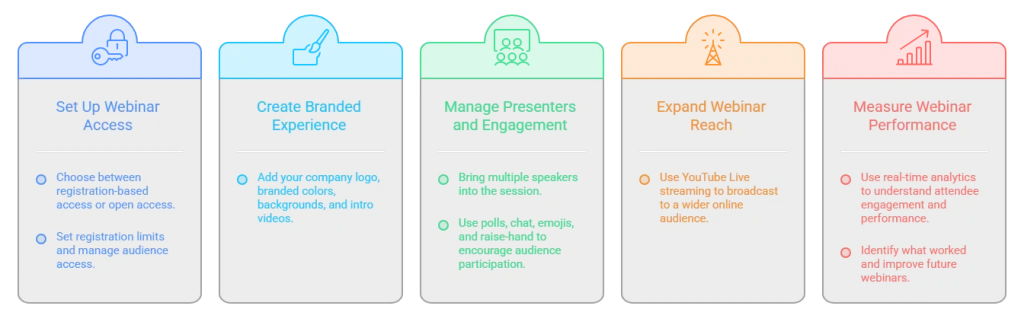
Hosting a professional integrated webinar solution is easier when the platform takes care of registration, presenters, audience engagement, and event performance in one place. With inMeet, you can create a webinar that is designed around your audience and event goals.
The biggest hurdle in hosting a webinar is getting people into the room. Every extra step you ask a user to take is a chance for them to give up.
Five years ago, this process was complicated. If you wanted to host a training session for fifty people, you would send out an email with a link. When people clicked that link, a box would pop up. It would tell them to download heavy webinar hosting software. Some people would not have the right password to install new programs on their work computers. Others would try to download it, but their internet would be too slow. Some would join the call, but their video would freeze constantly.
Think about your own experience. Have you ever tried to join online meetings and failed? Maybe the link did not work. Maybe the software needed an update. Maybe you forgot your password. These small issues add up. They waste time. They create frustration.
For a host, this is a nightmare. As the host, you would spend the first twenty minutes of your hour-long webinar just helping people fix their technical glitches.
But inMeet has changed all that. It simplifies the entire process of joining the webinar and hosting the one when needed.
It is a cloud-based team webinar collaboration platform which uses a technology called WebRTC. You do not need to memorize that name, but you should understand what it does.
It stands for Web Real-Time Communication. This technology allows video and audio to work directly inside a web browser. A web browser is like Chrome, Firefox, or Safari, you use to visit websites online.
Because inMeet uses this technology, your attendees do not need to install anything. They do not need to download a plugin. They do not need to wait for a software update. They simply open a web browser, type in the address, and they are in. It is that simple.
Imagine sending an invitation to a client. They click on your link, and the browser opens, and they are instantly in the webinar. They do not need to ask their IT team for permission. They do not need to configure their settings. They just join.
When you remove the need for downloads, you lower the barrier for everyone. You increase the number of people who actually show up to your webinar. You make the experience smooth from the very first second. This seamless entry is the first step to successful event hosting.
Another common fear when hosting a webinar is bad internet. We have all been in a video call where the picture turns into a blur of square blocks. Or worse, the audio starts to sound like a robot. This usually happens when the internet connection is not strong enough to handle the video. In the past, this would just break the call.
inMeet handles this problem with a smart system called Scalable Video Coding, or SVC.
With SVC, inMeet breaks the video into several smaller layers. It is like sending the package in three different parts. One part is the basic quality. Another part adds more detail. The last part makes it look high definition. If a user has fast internet, inMeet sends all three parts. The video looks amazing. If a user has slow internet, inMeet detects this immediately. It stops sending the high-detail parts. It only sends the basic layer. This means the video might look a little less sharp, but it will not freeze. The audio will keep playing smoothly. The user stays connected to the webinar. This happens automatically. Your team does not need to adjust settings. The attendees do not need to change anything. The software simply adjusts to give everyone the best experience their internet can handle.
Webinars often involve many people. You might be speaking to ten people, or you might be speaking to a hundred. Handling all these video feeds can be hard for a computer
inMeet uses something called a Selective Forwarding Unit, or SFU. Think of this as a traffic controller.
In some older video systems, every person’s computer had to talk to every other person’s computer directly. If you had 50 people, that is thousands of connections. It crashes computers.
The SFU changes this. It sits in the middle. Everyone sends their video to the SFU server. The server then decides who needs to see what. It acts like a smart mailman. It takes your video and delivers it efficiently to everyone else without mixing it all up.
This ensures that your webinar does not crash your computer. It ensures that the system is not overwhelmed. Even if the call is large, participants will not experience lag. With the power of enterprise webinar software, your team can host a large event with confidence, knowing the technology can handle the crowd.
In the modern world, people do not always work from a desk. Your team might be traveling. Your clients might be watching your webinar from a coffee shop using their phone. inMeet is designed to work on both mobile devices and computers. Because it uses browser technology, it works on laptops and desktops easily. But it also supports mobile apps for Android and iOS. This means your audience can join from a smartphone or a tablet. They get the same clear audio and video. This flexibility ensures you reach the widest possible audience. You are not excluding people just because they are not sitting at a desk.
When you are using a business webinar solution to discuss strategy or share private data, security is essential. You need to know that no one is listening in who should not be there.
inMeet takes security very seriously. It uses strong encryption methods to protect your data.
Encryption is like a secret code. When your video leaves your computer, inMeet scrambles it into a code. This code travels across the internet. When it reaches the other person, their computer unscrambles the code so they can see the video. If a hacker tries to steal the data while it is moving across the internet, all they will see is the scrambled code. They cannot see your video or hear your voice.
Your webinar is an extension of your brand. When you host a webinar, you want it to look like it comes from your company, not just a generic video tool.
inMeet offers white-label options. This means you can remove the inMeet branding. You can replace it with your own. You can use your own colors. This might seem like a small detail, but it makes a big difference. It makes your webinar look professional. It builds trust with your audience.
Users can also use virtual backgrounds. If a presenter is working from a home office that is a little messy, they can replace their background with a professional image. This keeps the focus on the speaker and the content.
Budget is always a concern for businesses. Many webinar platforms are expensive. They charge you per user. They charge you for extra features. The costs can spiral out of control.
inMeet offers a smarter model. It is called concurrent licensing. This might sound like a complex term, but it is simple. It means you pay for the number of active meetings, not the number of employees.
Let us say you have 100 employees. In a traditional model, you might have to buy 100 licenses. But in reality, only 5 people are hosting meetings at the same time. With inMeet, you only pay for those 5 ports. This saves a lot of money. It creates efficiency.
You get all the premium features without the premium price tag. You get 4K video. You get a recording. You get analytics. You get it all. This makes a premium business webinar solution accessible to smaller businesses. It levels the playing field.
When you host a webinar, you are like the conductor of an orchestra. You need to control who speaks, what is shown on screen, and how the audience interacts.
inMeet provides tools for easy webinar management that put the host in the driver’s seat.
In a large webinar, you cannot have everyone talking at once. It would be chaotic. inMeet gives the host tools to manage participants.
Before the webinar even begins, you can use Waiting Rooms. This feature places participants in a virtual waiting area before they enter the main meeting. This prevents uninvited guests from crashing your webinar and keeps the environment professional.
Sometimes a webinar is not just about one person talking. Sometimes you want to foster better team collaboration.
inMeet has a feature called Breakout Rooms. This allows you to take a large group of participants and split them into smaller groups. You can use Breakout Rooms to divide the twenty people into four groups of five. They go into their own separate video rooms. They can talk and work together without hearing the other groups.
As the host, you can jump between these rooms to check on them. When the time is up, you bring everyone back to the main meeting room. This is incredible for workshops and fostering team webinar collaboration. It turns a passive listening experience into an active working session.
Most webinars involve showing slides, documents, or websites. inMeet includes a screen sharing feature. This allows you to show your computer screen to everyone in the audience. You can choose to show your whole desktop or just one specific window.
Sometimes people have questions but do not want to speak out loud. Or maybe you want to share a web link with the group. inMeet includes a chat feature. This allows text messages to be sent during the video call. You can send a message to the whole group. Or, users can send private messages to each other. This is very useful for keeping engagement high. You can ask a question like, where is everyone joining from? and watch the answers roll in through the chat. It creates a sense of community without interrupting the flow of your presentation.
Keeping an audience awake and interested can be hard. The polling feature helps you solve this. It allows you to ask a question to your entire audience at once. You can give them multiple choices to pick from.
When you launch a poll, it pops up on everyone’s screen. They vote for their answer instantly. You can then see the results and share them with the group. This turns listeners into active participants. It helps you understand what your audience is thinking and keeps them focused on your presentation.
Not everyone will be able to attend your webinar live. People have busy schedules. Time zones can make it difficult for international teams to join. inMeet includes a recording feature. With the click of a button, you can record the video and audio of your session. Once the webinar is over, you have a video file. You can share this with people who missed your digital events. You can save it as training material for new employees. This extends the value of your webinar. The effort you put into the presentation continues to pay off long after the live sessions end.
Hosting a webinar should be exciting. It is a chance to share your knowledge. It is a chance to inspire people. It is a chance to grow your business. It should not be a source of stress.
inMeet understands this. It removes the technical hurdles. It gives you a platform that works. It is simple enough for a beginner. It is powerful enough for an expert.
When you use inMeet, you stop worrying about the tool. You start focusing on your message. It takes care of the video quality. It takes care of the audio clarity. You focus on your audience. You focus on the connection. That is what easy webinar management feels like. That is how inMeet helps you host webinars easily.
So, the next time you have a great idea, schedule your webinar with inMeet.
Hosting becomes easier because dedicated platforms like inMeet work directly in your web browser without requiring any downloads. This removes the need for complicated installations, allowing your team and guests to join the event instantly with just one click.
Teams can manage events easily because modern platforms offer simple tools for controlling the room, such as muting participants or managing who can speak. Since the software runs on the cloud and in browsers, you do not need IT experts to set up servers or fix installation errors.
A professional platform should allow you to add your company logo and colors to the virtual meeting room to build trust. It must also include essential tools like high-quality screen sharing and the ability to record the session for future use.
Secure platforms use strong encryption to scramble your video and audio so that no one else can listen to your conversation. They also provide features like waiting rooms, which let you review and approve every person before they are allowed to enter the webinar.
Yes, teams can use chat features to send instant messages to each other or the entire audience during the presentation. This allows you to answer questions and coordinate the flow of the event without interrupting the person speaking.
Platforms use smart technology that automatically adjusts the video quality for each viewer based on their internet speed. This ensures the video plays smoothly for everyone, whether you have ten people watching or a very large crowd.
Have questions or need assistance? Fill out the form, and we'll get back to you right away!
Usually in 24 hours on working days.